Overview
What is PortPhantom?
PortPhantom is a Python-based network reconnaissance tool built for security professionals and penetration testers. It combines powerful scanning capabilities with intelligent service detection to provide comprehensive network visibility during authorized security assessments.
Key Features
- Comprehensive port scanning with customizable scan types
- Service version detection and banner grabbing
- Intelligent scan optimization and timing controls
- Multi-threaded scanning for improved performance
- Detailed reporting with exportable results
- Built-in vulnerability mapping capabilities
- Support for multiple output formats
- Stealthy scanning options to minimize detection
Installation & Setup
Prerequisites
Before running PortPhantom, ensure you have the following installed:
- Python 3.10 or higher
- pip package manager
- Administrative/root privileges (for raw socket scans)
Quick Start
Download and run PortPhantom with these simple commands:
# Download PortPhantom

wget https://joshcybsec.org/downloads/portphantom/latest/portphantom.py

wget https://joshcybsec.org/downloads/portphantom/latest/requirements.txt


# Install dependencies

pip install -r requirements.txt


# Make it executable

chmod +x portphantom.py


# Run a basic scan (authorized targets only!)

sudo python3 portphantom.py -a 192.168.1.1 -sC --portList common


# Run with service detection and vulnerability scanning

sudo python3 portphantom.py -a 192.168.1.1 -sC --portList common -sv --show-vulns


# View all options

python3 portphantom.py -h
Dependencies
nvdlib==0.7.6

pyfiglet~=1.0.4

rich~=14.2.0

scapy~=2.6.1
Usage Examples
Basic Port Scan
# Scan common ports with connect scan

sudo python3 portphantom.py -a 192.168.1.1 -sC --portList common


# Scan specific port range

sudo python3 portphantom.py -a 192.168.1.1 -sC --startport 1 --endport 1024


# Scan with 10 threads for faster results

sudo python3 portphantom.py -a 192.168.1.1 -sC --portList common -t 10
Advanced Scanning with Vulnerability Detection
# Full scan with service detection and CVE lookup

sudo python3 portphantom.py -a 192.168.1.1 -sC --portList common -sv --show-vulns


# Stealth SYN scan with vulnerability assessment

sudo python3 portphantom.py -a 192.168.1.1 -sS --portList common --show-vulns


# Scan network range with ping sweep

sudo python3 portphantom.py -a 192.168.1.0/24 -sC --portList web -ps
Output and Reporting
# Save results to CSV

sudo python3 portphantom.py -a 192.168.1.1 -sC --portList common -out scan_results.csv -f csv


# Save to TXT with custom filename

sudo python3 portphantom.py -a 192.168.1.1 -sC --portList common -out report.txt


# Display only open ports

sudo python3 portphantom.py -a 192.168.1.1 -sC --portList common --display open
Demo
PortPhantom in Action
Below is a screenshot of PortPhantom scanning a test environment with service detection and vulnerability assessment enabled. The tool automatically identifies open ports, detects running services, and queries the NVD database for known CVEs.
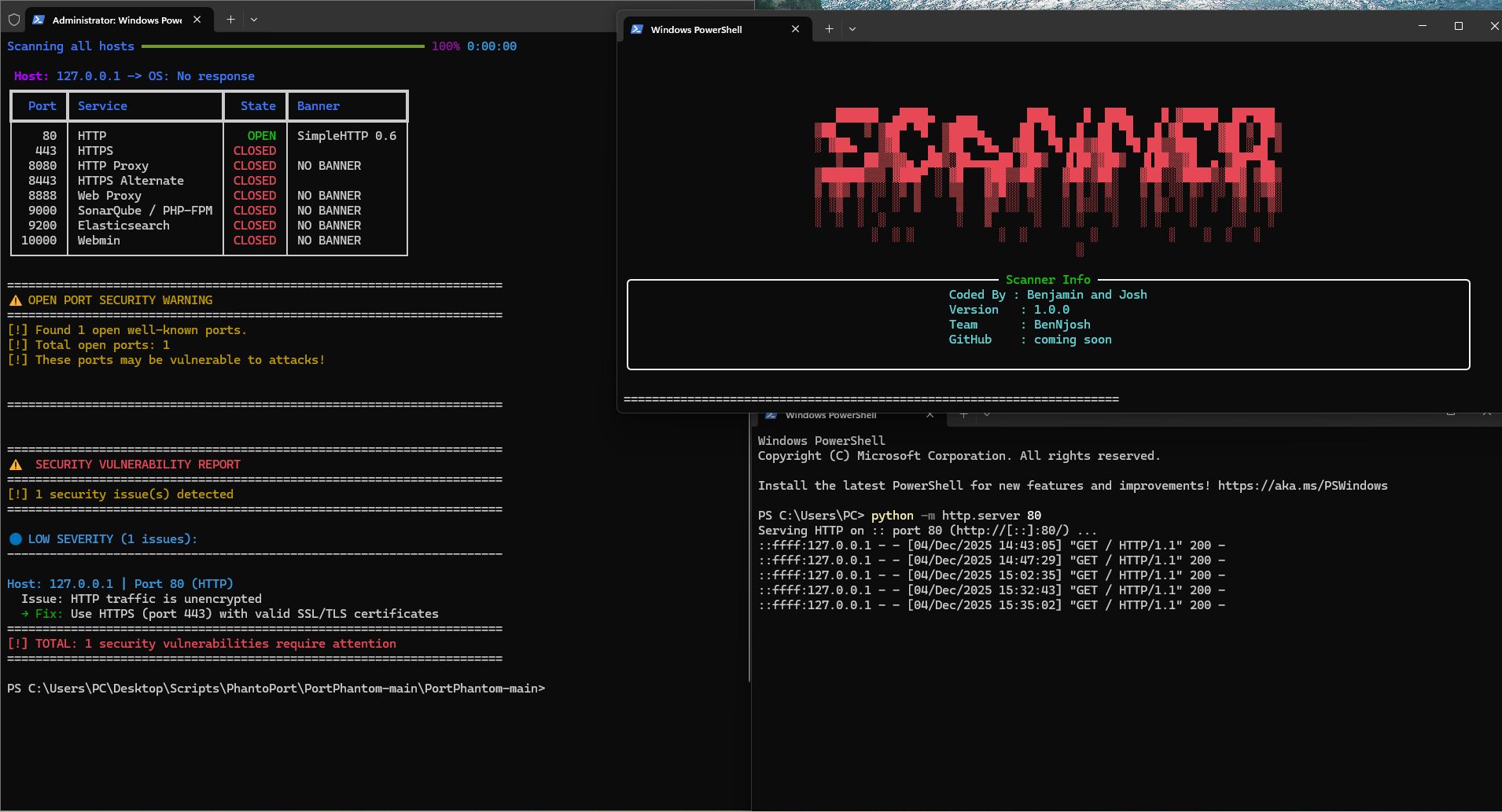
The scan reveals open services with their versions, along with critical/high/medium severity vulnerabilities found in the National Vulnerability Database.
Technical Architecture
What Makes PortPhantom Different
PortPhantom goes beyond traditional port scanning by integrating vulnerability intelligence directly into the scanning workflow. Here's what sets it apart from tools like Nmap:
- Automated CVE Lookup: Queries the National Vulnerability Database (NVD) API to match detected service versions with known vulnerabilities
- Intelligent Banner Parsing: Extracts product names and versions from service banners and automatically maps them to CPE (Common Platform Enumeration) identifiers
- Built-in Security Scoring: Provides CVSS severity ratings (CRITICAL/HIGH/MEDIUM/LOW) with specific remediation recommendations
- Vendor/Product Mapping: Recognizes 35+ major vendors and products (Apache, Nginx, MySQL, PostgreSQL, etc.) for accurate vulnerability matching
- Dangerous Port Warnings: Alerts when scanning or discovering sensitive ports like SMB (445), RDP (3389), Redis (6379), MongoDB (27017)
- OS Fingerprinting: Uses both TTL-based detection and banner analysis to identify target operating systems
- Interactive TUI: Rich terminal interface with real-time progress tracking and color-coded results
Core Technologies
- Scapy: Packet manipulation for SYN/ACK/FIN/RST scans at the network layer
- Socket Programming: Python's socket library for TCP connect scans and banner grabbing
- Threading & Process Pools: Concurrent scanning with configurable thread counts for performance optimization
- NVDLib: Official NIST National Vulnerability Database Python library for CVE queries
- Rich Library: Advanced terminal formatting with tables, progress bars, and color-coded severity indicators
Scan Types Supported
- Connect Scan (-sC): Full TCP three-way handshake, most reliable but more detectable
- SYN Scan (-sS): Stealth half-open scan, requires root privileges
- ACK Scan (-sA): Firewall rule mapping and stateful firewall detection
- FIN Scan (-sF): Stealthy scan using FIN packets to evade basic IDS
- RST Scan (-sR): Reset-based scanning for firewall fingerprinting
Download PortPhantom
Get the latest stable release or previous versions
Latest Build
Always Current
Download the most recent stable release with all features including CVE lookups, service detection, and vulnerability assessment.
⬇️ Download Scanner📂 Source Code
PortPhantom is open source. View the complete source code, report issues, and contribute on GitHub.
💻 View on GitHubLegal & Ethical Use
PortPhantom is a powerful security tool that must be used responsibly and ethically. By downloading and using this software, you agree to:
- Only use PortPhantom on networks and systems you own or have explicit written authorization to test
- Comply with all applicable laws and regulations in your jurisdiction
- Take full responsibility for your actions and any consequences of using this tool
- Not use this tool for illegal activities, unauthorized access, or malicious purposes
The author provides this tool for educational and authorized security testing purposes only and disclaims all liability for misuse.